AVRET Platform logo

AVRET: native macOS programming, diagnostics, and reverse-engineering tools for embedded systems engineers.

The platform centralizes programmer management, chipset discovery, physical-target verification, memory programming, firmware backup and comparison, EEPROM analysis and editing, fuse research and configuration, production-image creation, chip and code cloning, firmware disassembly and reverse engineering, visual MCU pin analysis, practical engineering calculators, and much more inside one connected desktop workspace.

Currently supporting Microchip processors with more support coming.
AVRET hero artwork
Try AVRET now

Support for Hundreds of CPUs and Programmer Types

AVRET currently supports hundreds of Microchip microcontrollers and programmer configurations, providing immediate access to processor-specific resources, capabilities, and programming requirements. We’re betting you have never seen anything this dynamic—or this well centralized.

Intelligent Programming

AVRET instantly and dynamically adjusts to the programmer and programming methods available for the processor you select. No more guessing—from high-voltage programming to supported Optiboot bootloader workflows and everything in between.

MCU Visualization Tools

Quickly generate a virtual map of the selected microcontroller to support design, development, and diagnostics. AVRET brings processor architecture, pin functions, engineering calculations, and development tools together in one clear, interactive workspace. The engineers behind AVRET have used proprietary versions of these tools for years to remove design pain and guesswork.

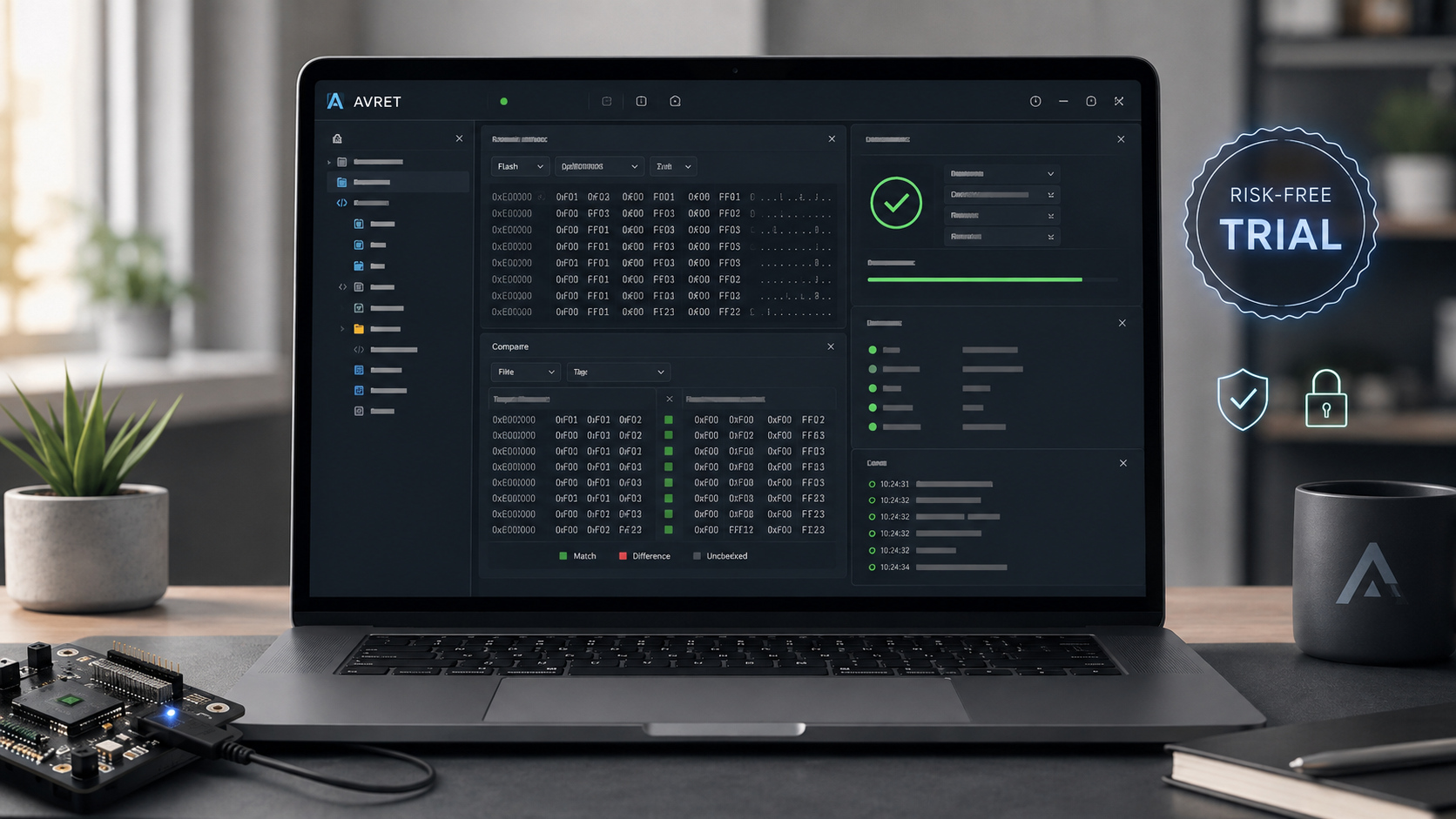
AVRET risk-free trial promotional graphic shown on a laptop screen

Try Before You Buy — Risk Free

Experience the fully functional platform with no obligation. No ads, no nonsense, and no data mining—we respect your privacy.

Industry analysts told us AVRET could be priced in the hundreds of dollars. We chose a more accessible price so students, makers, and professionals can all use it. The lower price does not mean fewer capabilities—it reflects our goal of making powerful tools available to everyone.

MacOS 13.5 and higher Universal Distribution (Supporting both Intel and Apple Powered Macs)

AVRET mascot holding a Click to Download Now sign

Today, engineers often find themselves working across a collection of disconnected tools and interfaces. Many of these tools do not align with their preferred workflow. Some are heavily terminal-based, requiring extensive typing and creating unnecessary opportunities for error. Others feel limited, fragmented, or added to an IDE as an afterthought.

Critical configuration options, programming modes, and device-specific capabilities are also frequently overlooked because the information is scattered across multiple tools, documents, and workflows.

AVRET was designed to solve that problem. We created a clean, intuitive, and highly capable user experience that brings essential engineering resources, programming functions, visualization tools, and processor intelligence into one centralized platform.

We did not originally set out to build a Swiss Army knife for microcontroller engineering. Instead, AVRET evolved naturally from years of real engineering work. Each tool was developed out of necessity to remove friction, reduce errors, and make complex development tasks faster and easier.

Illustrated AVRET engineering mascot standing beside the Why AVRET section

Expanded and Ever-Evolving

Our embedded systems are not limited to Microchip products. We work with technologies from STMicroelectronics, Texas Instruments, Espressif, Intel, and many others.

As we release selected internal tools, we will continue expanding the platform to support more devices and workflows—including the chips used by students, emerging developers, and experienced engineers alike.

Ashley the engineer working at an electronics bench
A student and a professional engineer reviewing technical work together

Built for the student, the practitioner, and the expert power user.

AVRET was built for everyone from the basic user to the expert power user, and every skill level in between. It provides a friendly work environment for the student through the professional.

Whether you are just starting out in electronics or simply need better tools, AVRET has you covered.

If you represent a school or STEM education program and require multiple licenses, please contact us to learn more about our educational discount program.

A connected workbench for the entire device workflow.

Dashboard

The AVRET Dashboard gives you an at-a-glance view of your selected CPU/MCU, programming method, recent activity, device catalog, and toolchain status. Quickly access datasheets and product information, and verify that the connected device matches your selection before programming. The built-in CPU/MCU Pin Simulator lets you identify pin functions without digging through datasheets. You also have one-click access to erase the connected device when needed.

Flash Device

Flash individual memory regions or the entire device without juggling terminal commands. Quickly test your programmer and setup with a single click, then choose the erase options you need. Drag and drop your compiled files directly onto the Flash pad and program the device in seconds.

Compare

Compare a connected device or firmware file directly against another device or file with just a few clicks. AVRET quickly tells you whether they match and highlights any differences in its built-in HEX/DIFF editor. No more guessing which .elf, .bin, or .hex file is correct. Get a clear answer and take control of your firmware workflow.

Backup

Back up your development devices and critical memory regions—including application memory, EEPROM, lock bits, and calibration data—with a clean, streamlined workflow. AVRET can also package your firmware for web distribution and automatically authenticate each release using one of seven integrity methods: CRC32, MD5, SHA-1, SHA-256, SHA-512, SHA3-256, or BLAKE3. Give your clients, customers, or users a verified firmware package they can trust before flashing.

EEPROM Configurator

Create, read, or load EEPROM data for your CPU/MCU projects with a far more capable workflow. AVRET’s built-in HEX editor lets you inspect, modify, and organize EEPROM content to fit your application—from managing serial numbers and configuration data to storing bitmaps, lookup tables, and larger variables.

Fuses

MCU fuse settings can be confusing, unforgiving, and in some cases capable of leaving a prototype or production device unresponsive or broken. AVRET provides a methodical fuse workflow for reading and generating settings, writing changes, comparing configurations, and researching fuse options offline using current Microchip device specifications. Explore and configure fuses with greater confidence.

Device Image

Create production device images that align with Microchip manufacturing workflows. Whether you need to generate a production-ready .ELF file or program a complete production image directly to a device, AVRET keeps the process organized, repeatable, and under control.

Clone Device

Build an army of embedded devices with AVRET’s powerful cloning engine. Clone from file to device, device to file, or device to device, with the option to copy the entire device or only selected memory regions. And when one target isn’t enough, AVRET can clone the same codebase across as many devices as you need in a single session—one firmware image, N boards.

Disassembly

Explore the Dark Arts with powerful reverse-engineering tools from disassembly and assembly analysis to higher-level code, helping expose exactly what embedded firmware is doing. To function-to-pin visual mapping and advanced filtering, connecting software behavior directly to CPU/MCU hardware.

AVRET representative engineer working at a Mac with code displayed on a monitor

This is just to name a few of the powerful tools you'll find in AVRET.

Turn installed Device Pack data into an interactive engineering reference.

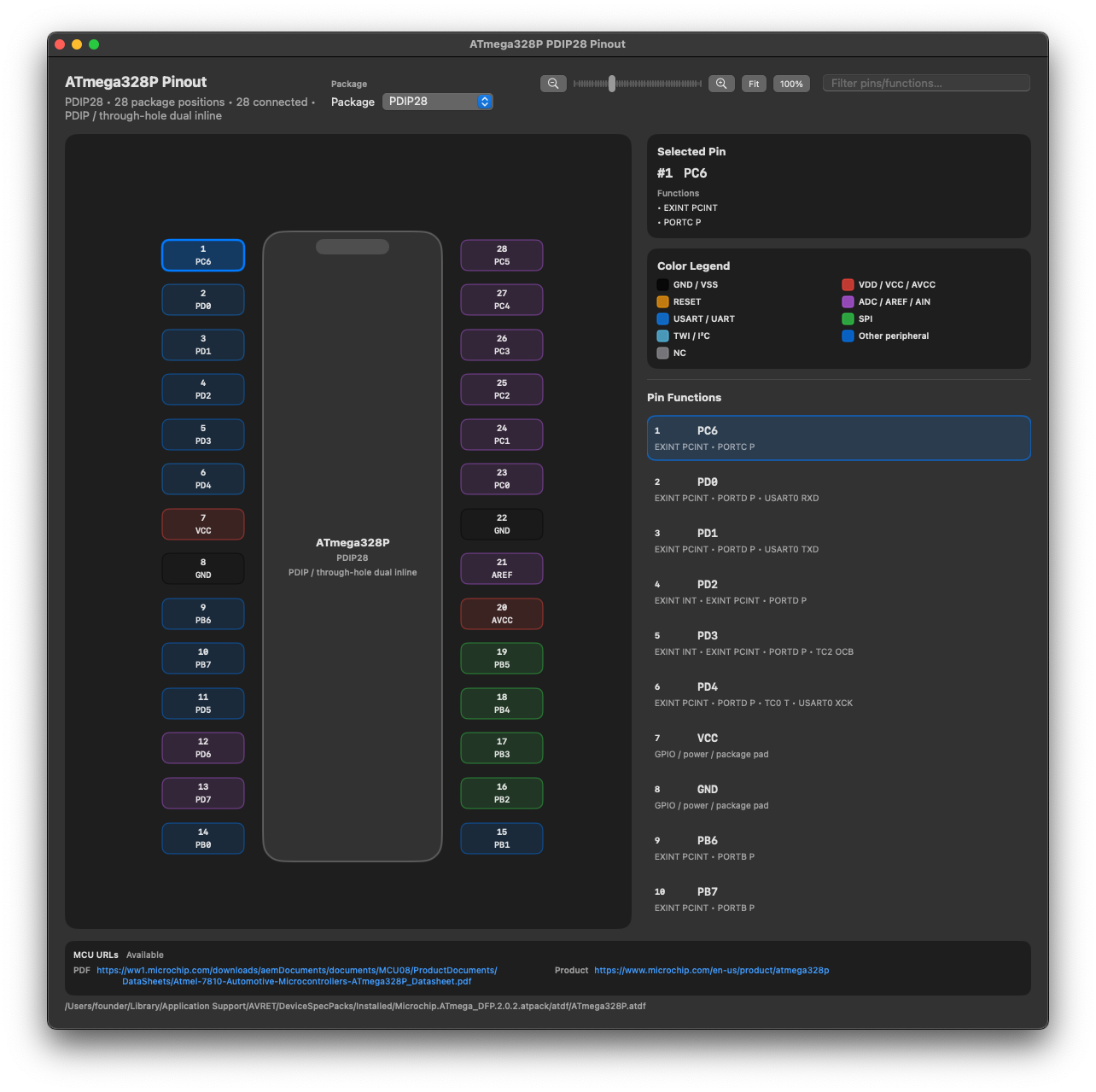
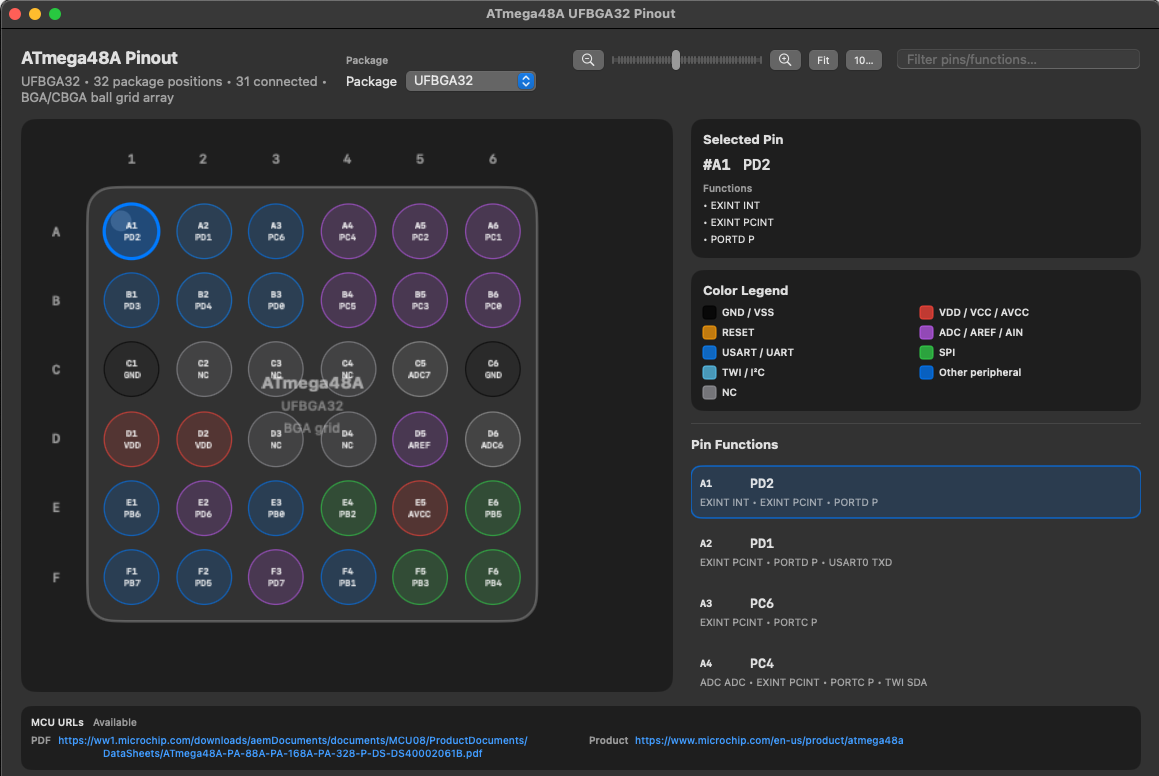
AVRET generates package-aware MCU pinout drawings from installed Microchip device data. Switch package types, search pins and functions, inspect selected-pin details, open associated datasheets, and connect code activity back to hardware pins.

Continue through the workbench
AVRET ATmega328P package and pinout simulator
Package-aware MCU visualization generated from installed device-pack data.

Keep everyday engineering calculations near your fingertips.

Enjoy three core calculators that can float, pin, or collapse—keeping essential engineering tools at your fingertips at all times. In addition to these core calculators, AVRET provides access to 31 power- and electrical-engineering-specific calculators, along with interactive logic and visual analysis tools. You also have a complete set of bitwise calculation and manipulation tools for binary operations, masks, shifts, rotates, and more.

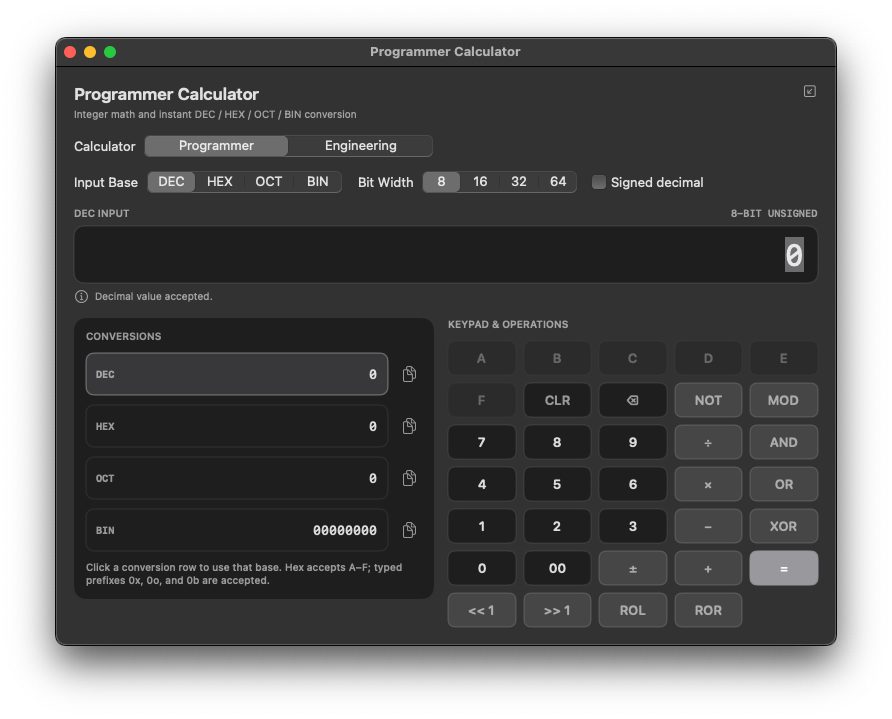
AVRET Programmer Calculator showing decimal, hexadecimal, octal, and binary conversion with keypad operations

Programmer calculator

Instant DEC, HEX, OCT, and BIN conversion with selectable widths, signed handling, keypad operations, and copy-ready results.

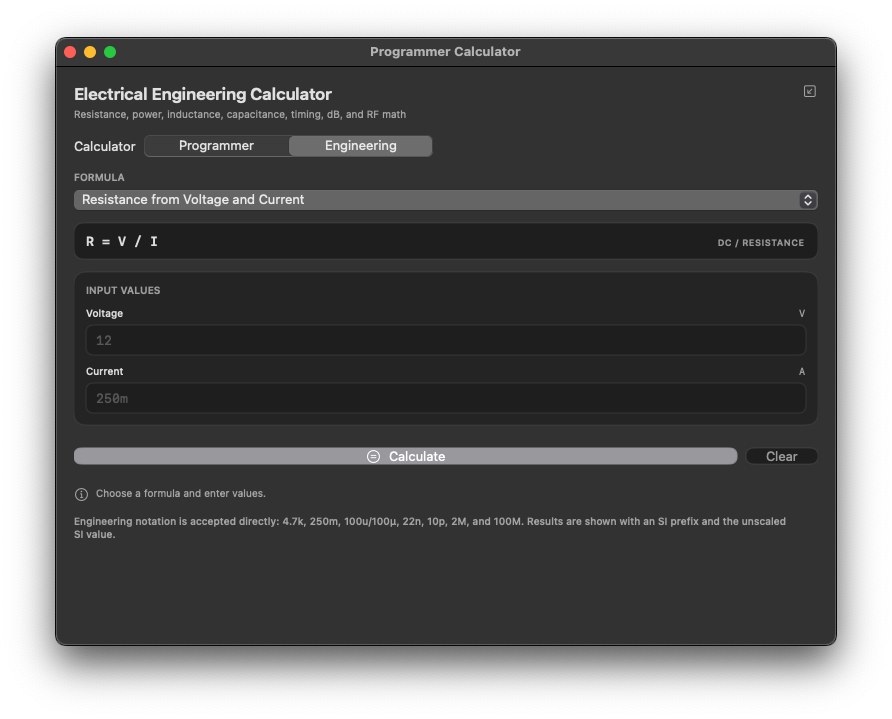
AVRET Electrical Engineering Calculator showing formula selection and engineering-value inputs

Engineering calculator

A practical engineering formula library for resistance, power, inductance, capacitance, timing, dB, RF math, and SI-aware value entry.

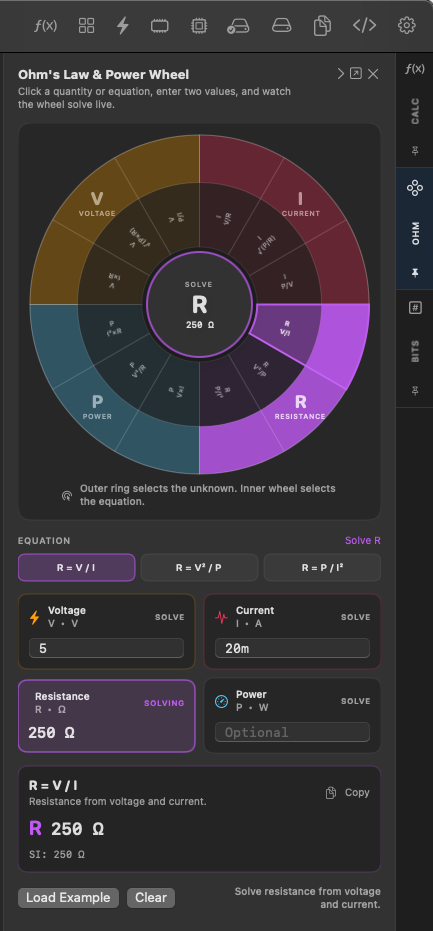
AVRET Ohm’s Law and Power Wheel showing interactive solve controls and live result output

Ohm’s Law + Power Wheel

Choose the unknown, pick the equation, and solve live with engineering notation, SI-formatted answers, and a highly visual workflow.

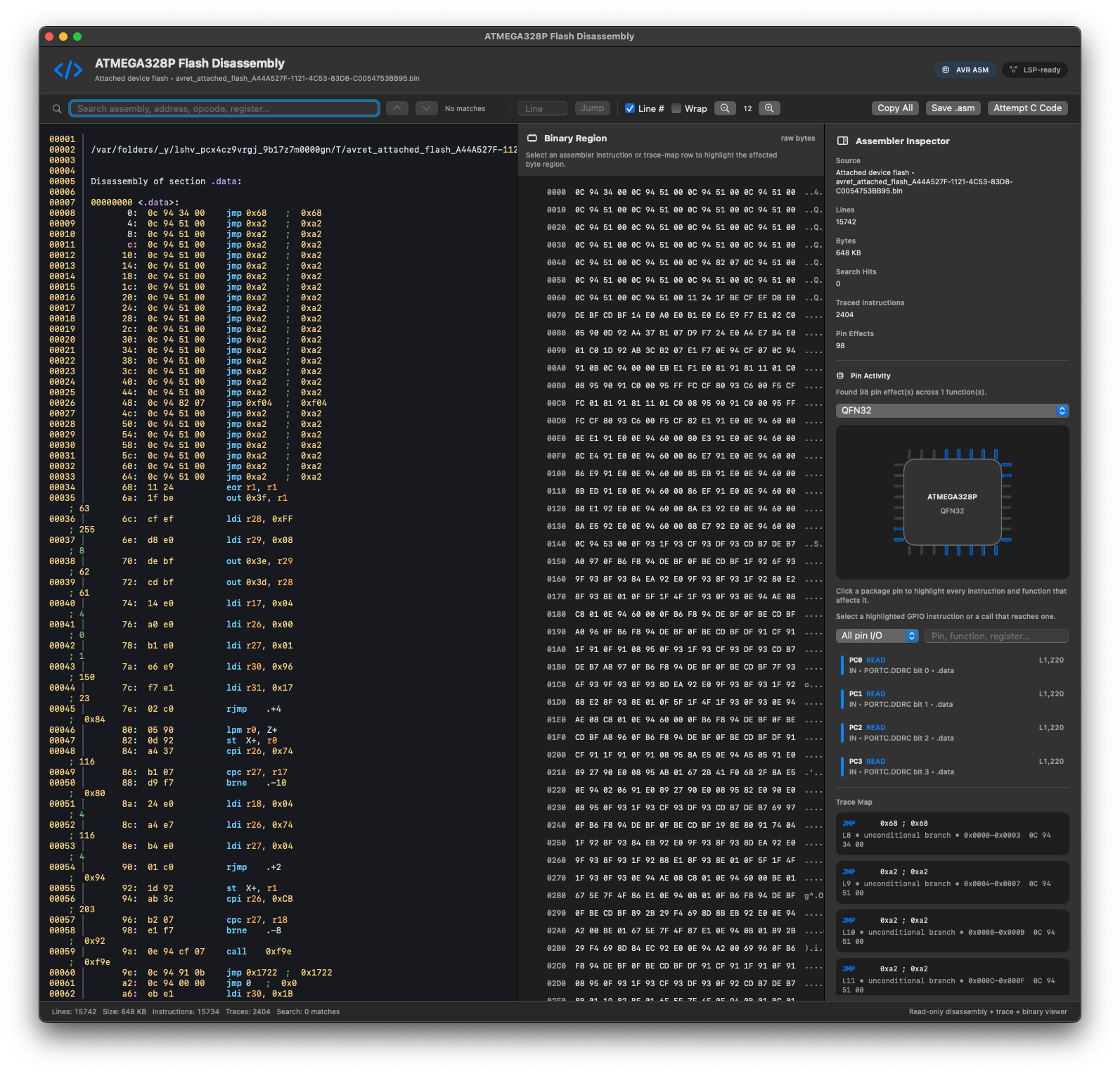
AVRET includes powerful reverse-engineering tools that let you decode and disassemble firmware directly from a target device or from an existing file—the source makes no difference to AVRET. Once the machine code is ingested, AVRET analyzes the firmware to expose what the code is doing, how functions interact, and how software activity relates to the underlying hardware. You can visualize which routines and instructions are interacting with specific CPU or MCU pins, helping connect firmware behavior directly to the physical device. For our customers, AVRET can take the analysis a step further by translating disassembled assembly into readable C-style code, making complex firmware significantly easier to understand, document, and reverse engineer.

AVRET ATMEGA328P flash disassembly view with search, binary region inspection, and pin activity analysis
AVRET character sitting on the AVRET Platform logo

AVRET can probe the target signature through the selected programmer or supported interface and resolve the device through its installed MCU catalog.

Yes. File comparison, fuse research, project work, calculators, installed Device Packs, datasheet references, and verified local device data remain useful offline.

For most AVRET tools, the answer is yes. We focus on creating a flexible desktop experience, allowing editors, terminals, calculators, and other tools to detach from the main window and operate independently when needed. A larger display gives you more room to take advantage of this workflow, but it is certainly not required.

AVRET servers and your local application maintains and manages backend processed versioned catalogs, datasheet and product-link data, meta-data and Microchip resources with validation and known-good local fallback. This is updated regularly to make sure our customers have the latest relases.

No. Morpheus Innovation Laboratory is an independent engineering design, fabrication, IP incubation, and consulting company. Morpheus Labs develops and purchases products directly from Microchip, but Microchip does not currently endorse or sponsor AVRET®. AVRET® leverages and automates publicly available resources provided to developers who use Microchip products.

Download Now buttonAVRET Portal Access button